
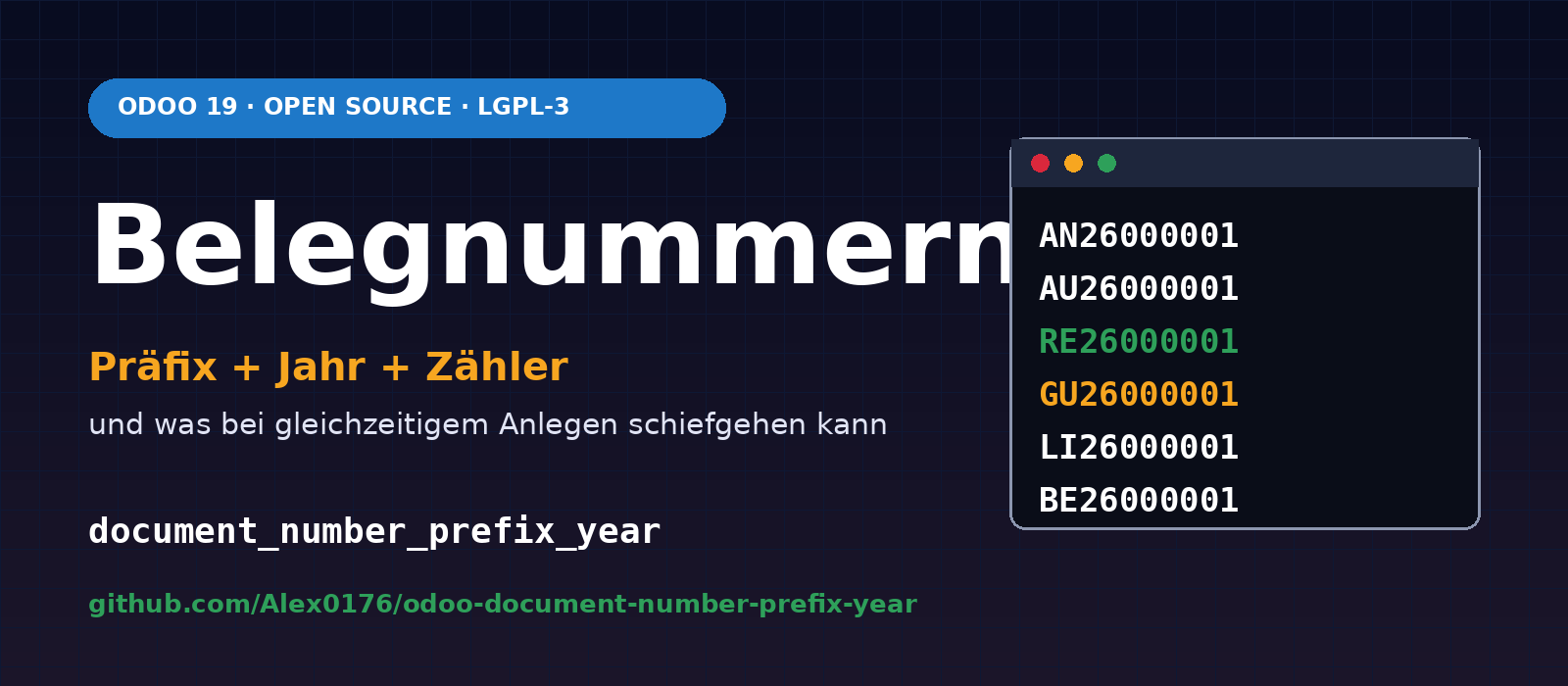
“AN26000001” tells you more than “S00001”: it is a quotation, it dates from 2026, and it is the first one. Many businesses, particularly those moving to Odoo from an older system, want to keep exactly this format for their document numbers. Odoo itself numbers quotations, orders and delivery notes using its own sequences (S00001, WH/OUT/00001, P00001), and invoices using the journal prefix and year (INV/2026/00001).
We developed the Document Numbering by Prefix and Year module (document_number_prefix_year) for Odoo 19 to address this. It is available on GitHub as free software under the LGPL-3 licence:
github.com/Alex0176/odoo-document-number-prefix-year
A frank note upfront: We do not use this module at Biricon IT Services. We are publishing it because it is complete, documented and comes with tests, and could save others some work. Anyone using it should read the sections on limitations and tests .
The numbering scheme
Each number consists of three parts: a prefix for each document type, the year and a counter with a fixed number of digits. You configure the prefix, year format (26 or 2026) and number of digits for each company under Settings → Document Numbering.
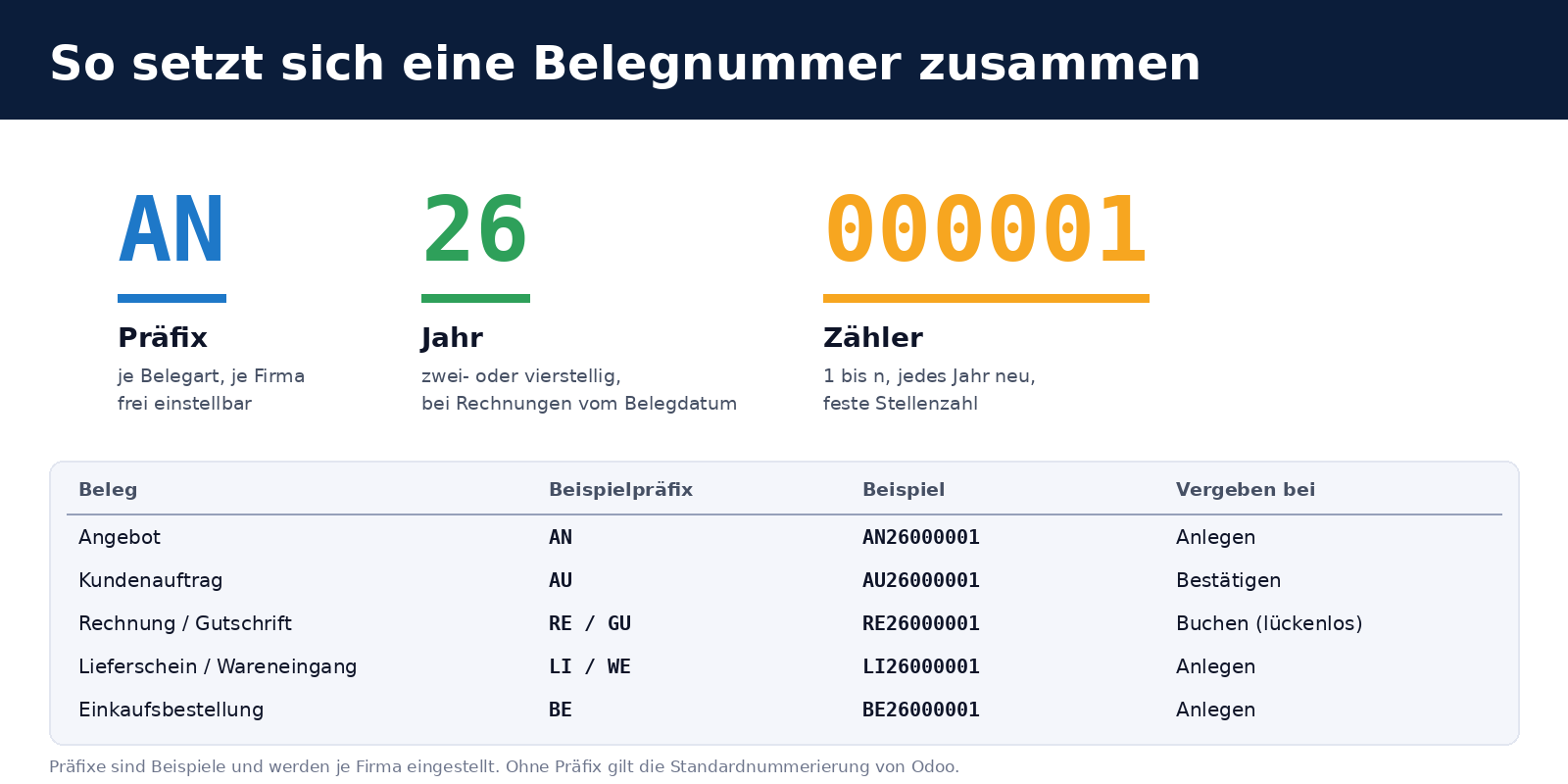
The module handles quotations, sales orders, customer invoices and credit notes, delivery notes, goods receipts and purchase orders. The prefixes in the illustration are examples only: AN, AU, RE, GU, LI, WE, BE. Leaving a prefix blank retains Odoo’s standard numbering for that document type. The module therefore does nothing until you configure it.
How the numbering works
- A fresh start each year. The counter resets to 1 at the start of each year.
- Continuing from imported numbers. The module finds the highest existing number with the same prefix and year, regardless of its length. If the database contains
AN26119from the old system, the next quotation will beAN26000120. This is what makes the module suitable for migrations: existing documents are imported with their original numbers, and new documents continue the sequence seamlessly. - A new order number on confirmation. If required, a confirmed quotation receives a number from the sales order sequence. The quotation number is retained in the order’s Quotation Number field and is available in the form, list and search.
- Invoices on posting. Customer invoices and credit notes receive their number only on posting, not on creation. Deleted drafts therefore leave no gap. The year comes from the invoice date: an invoice dated 30 December 2025 that is posted on 2 January 2026 is called
RE25…. - Everything else stays as it is. Vendor bills, payments, journal entries and manufacturing orders retain Odoo’s standard sequences. Existing names are never rewritten, even if you disable the module.
The tricky part: two users at once
Custom numbering looks simple: find the highest number and add one. It stops being simple when two users create a quotation at exactly the same time. Both read “highest number = 0”, and both assign AN26000001. Odoo uses database sequences to handle this for its own numbering. Custom numbering lacks that protection, and Odoo also has no uniqueness check on the name for quotations and purchase orders: two documents with the same number are simply saved.
The obvious safeguard is a lock. The module acquires a database lock (PostgreSQL Advisory Lock) for each company, prefix and year, and holds it until the transaction ends. The second user waits until the first has finished. But that alone is not enough, as we discovered in an experiment on a copy of the production database:
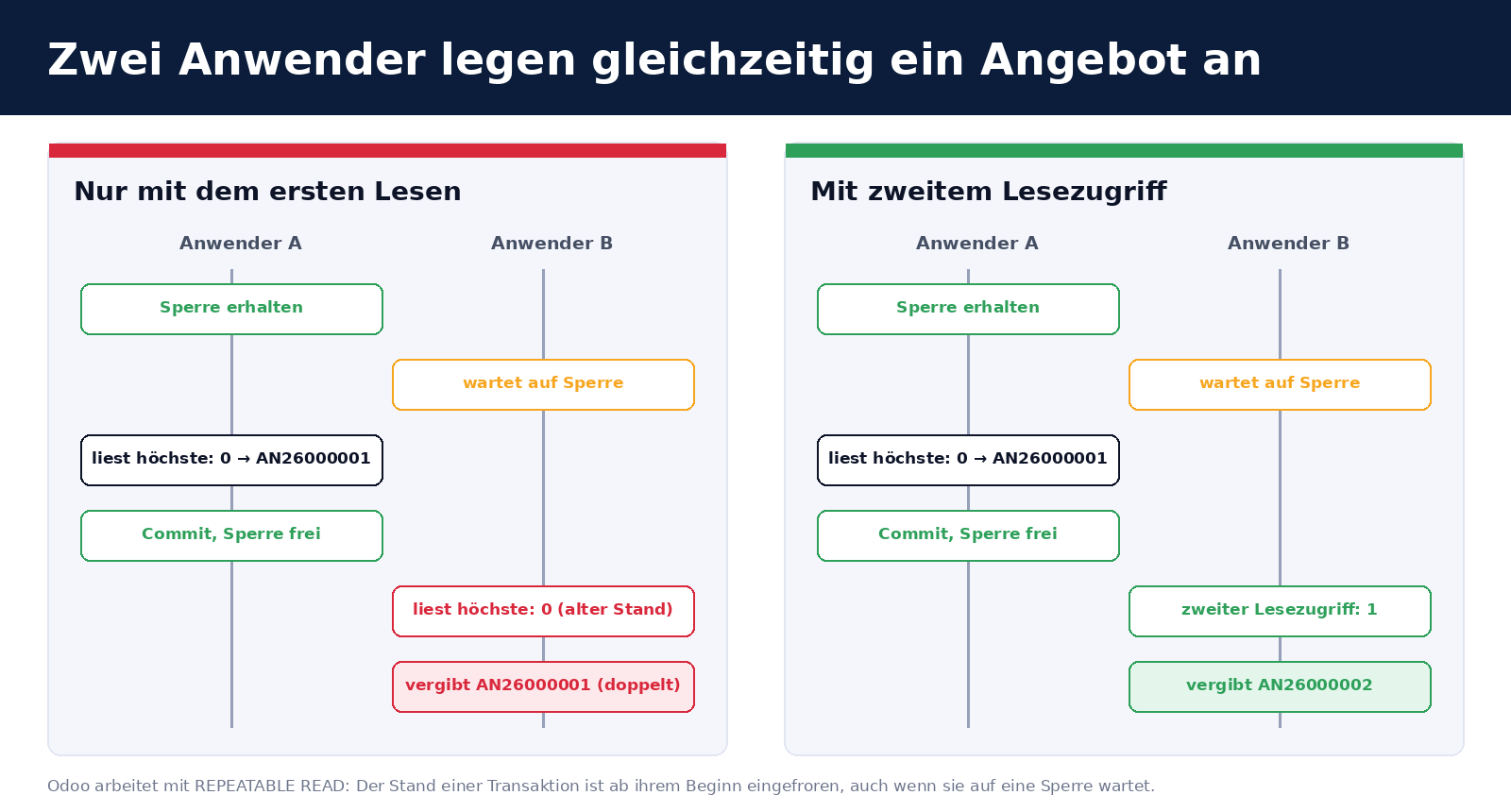
Odoo uses the REPEATABLE READ isolation level. The database snapshot a transaction sees is frozen at its first query. User B already has this snapshot before A finishes. If B then waits for the lock and acquires it, they still read “highest number = 0” from their old snapshot and assign the same number again. The lock has controlled the order of execution, but has not updated the information available.
The solution is a second read through a separate, short-lived database connection that sees all rows already committed. The higher of the two values wins. The first read is still necessary because only it can see numbers that the same transaction has already assigned but has not yet committed, for example when importing several documents in one batch.
We tested this with two transactions, verifying that the second had taken its snapshot before the first committed and then waited for the lock. Without the second read, both orders received the same number; with it, they received numbers 1 and 2.
For clarity: This experiment was a manual check. It is not part of the automated tests because it requires two actual database connections, which Odoo’s test environment (a single transaction per test) does not provide.
Technical implementation
| Document | Hook |
|---|---|
| Quotation | sale.order.create, when the name is empty, / or New |
| Sales order | sale.order.action_confirm, before standard confirmation |
| Invoice, credit note | account.move._set_next_sequence, called on posting |
| Delivery note, goods receipt | stock.picking.create by operation type |
| Purchase order | purchase.order.create |
- Counter. A regular expression (
^<Stamm>([0-9]{1,15})$, with the stem escaped) finds the highest number for each company, including names with no company assigned. - Invoices.
_set_next_sequencewrites the name and calls_compute_split_sequenceto keep Odoo’s sequence logic consistent (prefix, number and year detection for the journal’s next invoice). - Settings. The company fields
document_number_*are mirrored inres.config.settings. The settings reject prefixes containing spaces or ending in a digit. - Translation. A German translation is included.
Installation and setup
- Place the
document_number_prefix_yearfolder in the addons path. - Update the apps list and install the module. Sales, Purchase, Inventory and Accounting are required.
- Enter the prefixes, year format and number of digits under Settings → Document Numbering.
- Try it on a copy first. A document’s number cannot be automatically reverted later, and invoice numbers are subject to record retention and audit requirements.
limitations
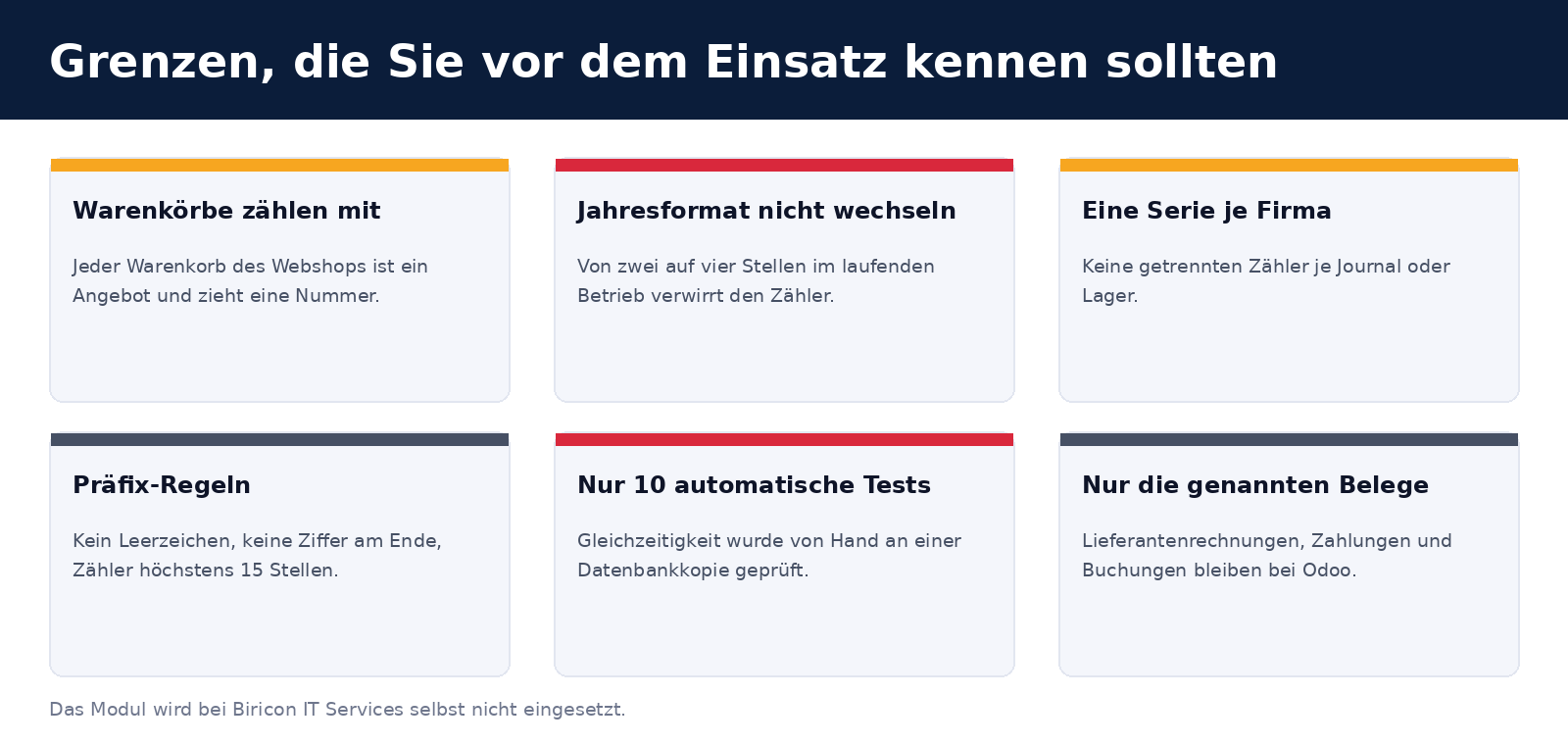
- Quotations are numbered when created. Deleted or cancelled quotations leave gaps. The same applies to any sales order created by another module: online shop baskets (
website_sale) are orders in Quotation status, and each uses a number. Only invoices and credit notes have gapless numbering because they are numbered on posting. - Do not change the year format once the module is in use. With the stem
AN26, the module reads an existingAN2026000001as counter value26000001. Set the format before creating the first document. - Counter limited to 15 digits. Longer digit strings after the stem are ignored when searching for the highest number.
- No separate sequences per journal or warehouse. The counter applies per company, prefix and year. Multiple sales journals share the invoice counter.
- Prefixes must not contain spaces or end in a digit, otherwise the prefix, year and counter can no longer be separated.
- Only the document types listed are handled.
tests
The module includes ten automated tests. They check:
- quotation and confirmation: quotation and order numbers, retention of the quotation number
- continuing the sequence after an imported number (
AN26119→AN26000120) - no retrospective renumbering of existing documents
- invoices, credit notes and year rollover based on the invoice date
- purchase orders and delivery notes
- blank prefix: Odoo’s standard number is retained
- four-digit year
- prefix containing special characters
- multiple numbers in one transaction
- very long digit strings are ignored
Command:
odoo-bin -d <Testdatenbank> -i document_number_prefix_year --test-enable --test-tags=/document_number_prefix_year --stop-after-initThe tests run with ordinary transactions. They do not cover simultaneous creation by two users; this was checked manually on a database copy as described above. Anyone using the module in a system with many concurrent users should repeat this experiment on their own database.
Legal note on invoice numbers
Under § 11 UStG, invoices must bear a sequential number assigned once to identify the invoice. The module numbers invoices on posting, with a separate counter for each prefix and year, which is consistent with this. You must discuss with your tax adviser whether your specific configuration (multiple journals, credit notes with their own prefix, year rollover) meets their requirements. This article does not constitute legal advice.
Frequently asked questions
Why not simply adjust Odoo’s sequences?
For invoices, this can be done through the journal prefix. For quotations, sales orders, delivery notes and purchase orders, however, there is no common scheme combining a prefix, year and counter that resets annually, and the counter does not recognise imported legacy numbers. This is where the module comes in.
Will existing numbering be overwritten?
No. The module only assigns new numbers. Names already saved remain unchanged, even when the module is disabled.
How do I disable it again?
Clear the prefix for the document type. Odoo will then resume its own numbering. Uninstalling the module does not change any numbers already assigned either.
Do you use it yourselves?
No. We use Odoo’s standard numbering. We have checked the module using the automated tests and the manual experiment described, but not in a live operation with many users.
Does it work with Odoo 17 or 18?
We have only tested it with Odoo 19.0 Community. It may or may not work with other versions; we have not checked.
What licence is it released under?
Under LGPL-3. Bug reports and suggestions for improvements are welcome as issues in the GitHub repository .
Support from Biricon IT Services
We support Odoo installations for small and medium-sized businesses, from implementation, customisation and migration through to day-to-day operation. If you want to retain your document numbers when migrating, have numbering tested under load or introduce a module like this safely into your production instance, we would be happy to help. More of our in-house developments: Company register and address checks for Austrian customers, Product sets as sections in quotations and Web RBL, the blocklist for attack traffic.
As at 3 November 2026. Module version 19.0.1.0.0. All numbers in the examples and illustrations are fictitious.