
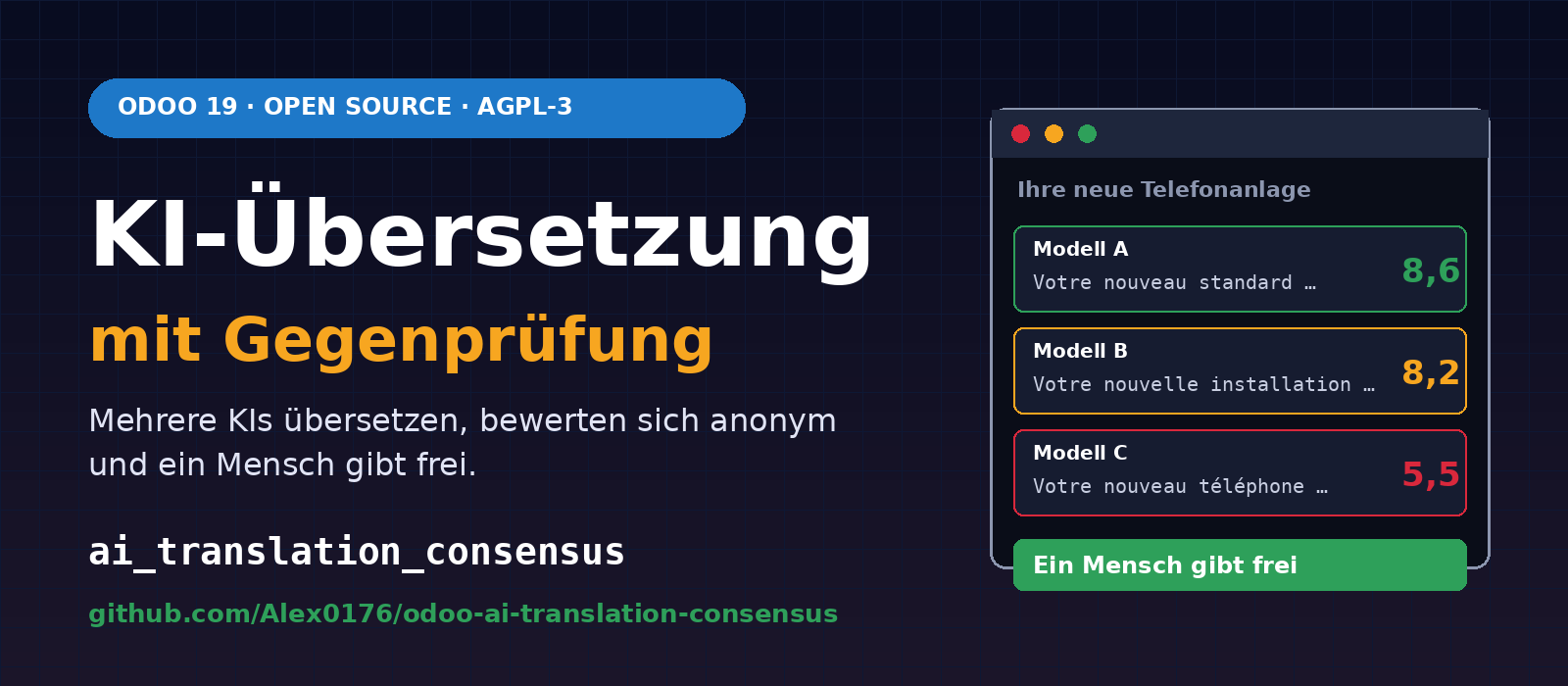
Translating a website into ten, twenty or forty languages is quick with a single AI. The harder question is whether you can trust the result. A single language model will occasionally invent words, translate product names or change a number without noticing. That is why we have written a module for Odoo 19 in which multiple AIs and translation services work on the same text and anonymously review each other's results, agreeing on wording that is both accurate and natural. Anything unclear is passed to a human for a decision.
The module is called ai_translation_consensus and is available on GitHub as free software under the AGPL-3 licence:
github.com/Alex0176/odoo-ai-translation-consensus
Contents
The idea: cross-checking rather than trust
The module can do two things:
- Translate: add missing translations (or update outdated ones) for any translatable field in Odoo: blog posts, web pages, menus, products and anything else Odoo stores in multiple languages. The AIs see more than just the individual sentence: they also receive neighbouring blocks and an extract from the full page. This helps them interpret individual words in the right context.
- Proofread: check text in its own language and suggest better wording or corrections. The original is always one of the candidates. If the original wins, nothing changes.
The core principle is mutual review. Each AI is good at assessing other people's texts, even if it occasionally gets things wrong itself. The module takes advantage of this: several providers each write a version, then those same providers assess all the versions without knowing who wrote them. Providers do not assess their own versions.
How a suggestion is produced
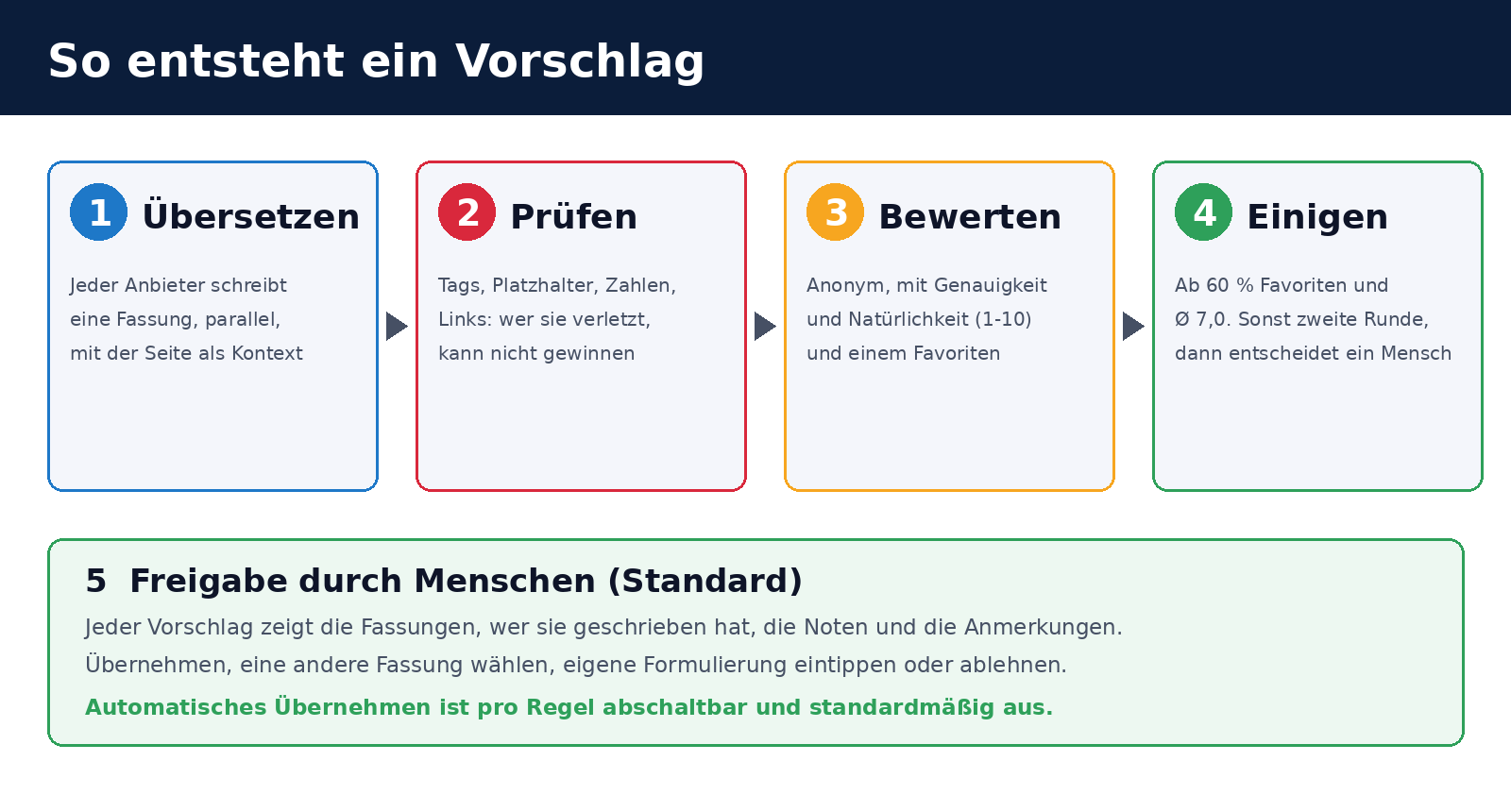
- Translate. Each translator produces a version in parallel.
- Fixed checks. Checks without AI verify that HTML tags, entities, placeholders such as
%sor{}, numbers and links remain unchanged. A version that fails these checks can never win, however fluent it sounds. - Assess. The remaining versions are shuffled and anonymised. Each reviewer scores every version for accuracy and naturalness (from 1 to 10), selects a favourite and can suggest an improvement.
- Reach consensus. A version's ranking score is 0.5 × average score + 5 × share of votes for favourite. Consensus is reached when the best version receives at least 60 % of the votes for favourite and an average score of at least 7.0.
- Second round. If no consensus is reached, the best versions go through another round of assessment, together with the reviewers' suggested improvements.
- Human decision. If there is still no clear result, the suggestion awaits a decision.
If only translation services without review capabilities are used (such as DeepL), a result is considered agreed only if at least two services return exactly the same text. For proofreading, the results must remain recognisably similar to the original (similarity of at least 0.6, with the same numbers). Small free models occasionally return misaligned or unrelated texts for a batch. These responses are discarded rather than put to a vote. A glossary preserves brand names and established terms.
Providers: with and without API keys
Free and paid services can take part in the same vote. The module includes presets for many providers; all are disabled after installation.
| Type | Translates | Reviews / corrects | Examples |
|---|---|---|---|
| OpenAI-compatible interface | yes | yes | OpenAI, Mistral, DeepSeek, xAI, Groq, Together, OpenRouter, Cerebras, Qwen, Moonshot, GitHub Models, Hugging Face, Ollama, LM Studio, vLLM, llama.cpp |
| OpenAI-compatible, no API key required | yes | yes | Ollama on your own server, Pollinations |
| Anthropic | yes | yes | Claude |
| Google Gemini, Cohere | yes | yes | |
| Local command | yes | yes | claude -p or any program that reads from stdin and outputs the response |
| Translation services | yes | no | DeepL, Google Translate, Azure Translator, LibreTranslate, MyMemory, Lingva |
Enter the API key (or the name of an environment variable containing it), click Test connection and enable the provider. The model names in the presets are starting points; check them against the provider's current list before using them. Two or more providers allow proper cross-checking; with just one, nobody reviews its work. The wizard points this out.
An entire website at once
A setup wizard (under AI Translation → Start here) explains the steps and creates the first rule. If the website module is installed, the integration module ai_translation_consensus_website is installed automatically. It adds the scope “An entire website and all its content”: select the website and ask for suggested content. The module checks all models with translatable fields belonging to the website (pages, menus, blogs, products, events, forums, courses and more) and suggests one rule per content type, using the website's languages as the target languages.
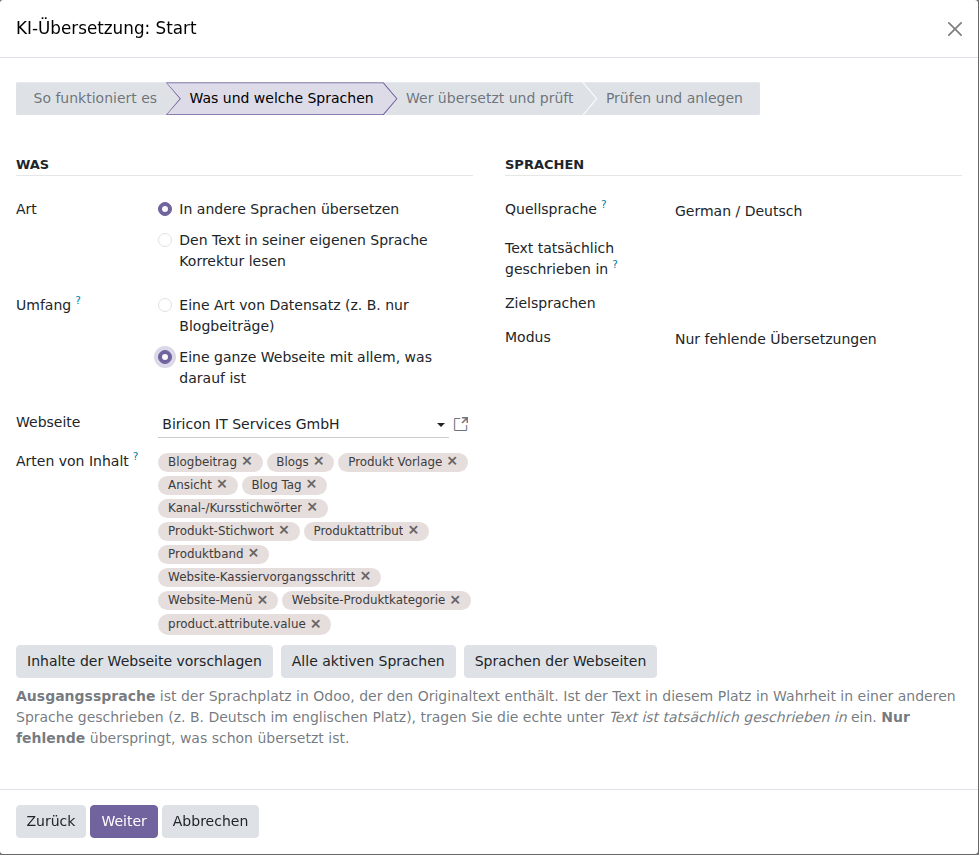
- Features that are not installed (forums, courses, galleries) do not appear and are added later once installed.
- Shop models are only suggested if the website has a shop. Only published records are included.
- The module deliberately excludes contacts, companies, payment providers, price lists, delivery methods, loyalty programmes and snippet filters.
- Page URL slugs (
seo_name) are not translated. - You can remove unwanted types before creating the rules.
Creating rules and searching cost nothing: the rule simply lists the texts that need work. Providers are only called, and costs incurred, during processing.
Dashboard, costs and automatic start
For each rule, the dashboard shows how many texts are complete, awaiting approval or a human decision, queued or failed. It also provides breakdowns by language and provider, costs incurred and expected remaining costs, estimated time remaining and a switch for scheduled processing.
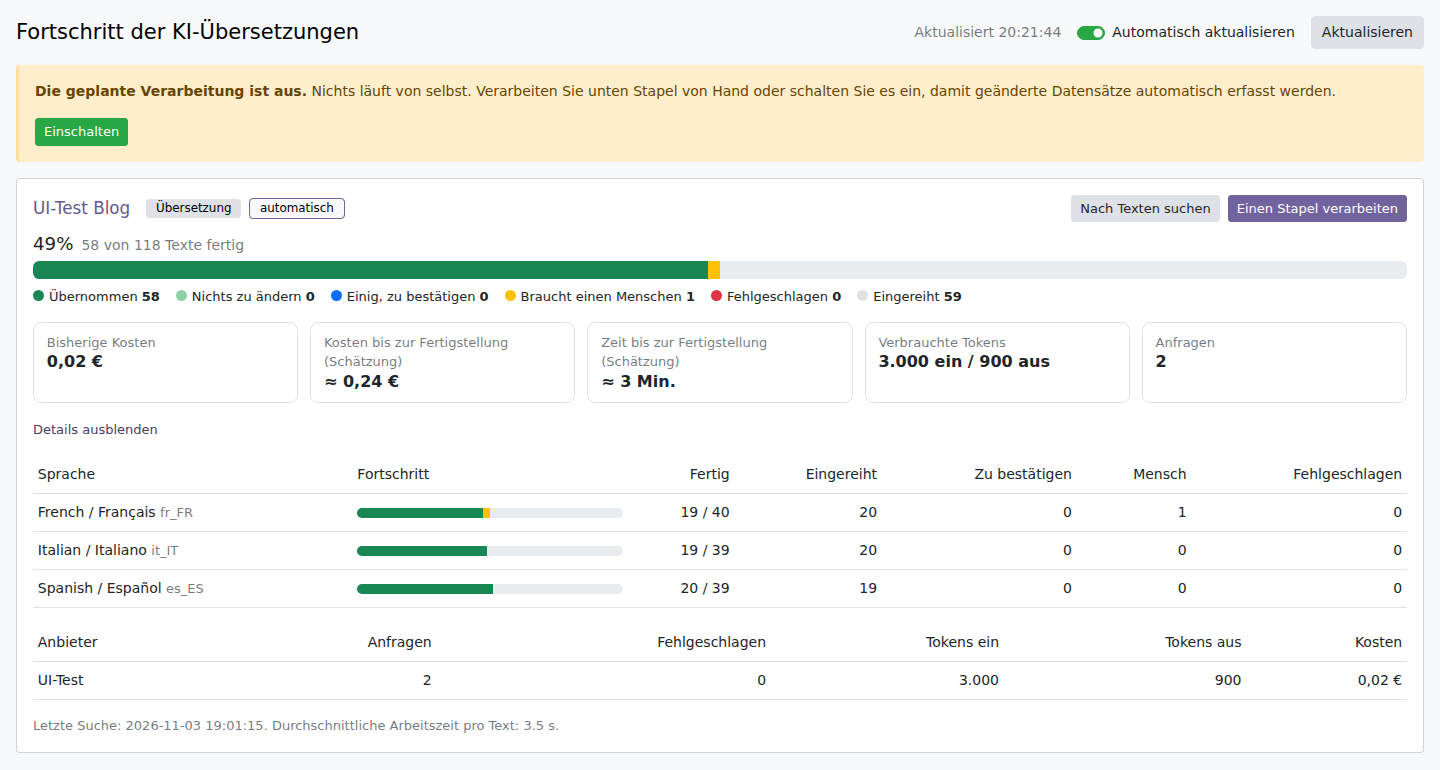
The figures in this screenshot are sample data and do not reflect actual costs.
- Costs are calculated from the usage actually reported by providers: tokens (OpenAI, Anthropic, Gemini, Cohere) or characters (DeepL, Google, Azure). Tokens are always displayed; monetary amounts appear only once you have entered the provider's price per million tokens (or characters). The presets contain no prices because these change. For services that do not report tokens, usage is estimated from the text length and labelled as an estimate.
- Forecast: average cost and processing time per text multiplied by the number of queued texts. This estimate improves as the first batches are processed.
- Automatischer Start: Regeln mit der Option Von selbst starten, wenn sich ein Datensatz ändert suchen bei jedem Lauf der geplanten Aktion nur Datensätze, die seit dem letzten Suchlauf geändert wurden. Mit eingeschalteter geplanter Aktion wird eine bearbeitete Webseite also ohne Handgriff erneut übersetzt.
- Subscription usage: For providers accessed through a command-line tool that you are signed in to (Antigravity, Codex), the module checks every ten minutes how much of the allowance for the current subscription window has been used and when it resets. For each active provider, the dashboard displays a usage bar with the reset time, along with requests made in the past 24 hours and the reason for any current pause. A button refreshes the figures immediately. This lets you see that a weekly allowance can be used up in just a few hours, before requests start being rejected. Providers that do not report usage (such as MyMemory) are explicitly shown as such, rather than being assigned a made-up figure.
- Completion notification: once the last outstanding text in a rule is complete, a single “All languages translated” message (or “All texts reviewed” for proofreading) appears in the AI Translation channel.
Human approval
By default, the module writes nothing to your records without approval. Each suggestion shows the versions, their authors, the scores and the reviewers' comments. You can accept the suggestion, choose another version, enter your own wording or reject it.
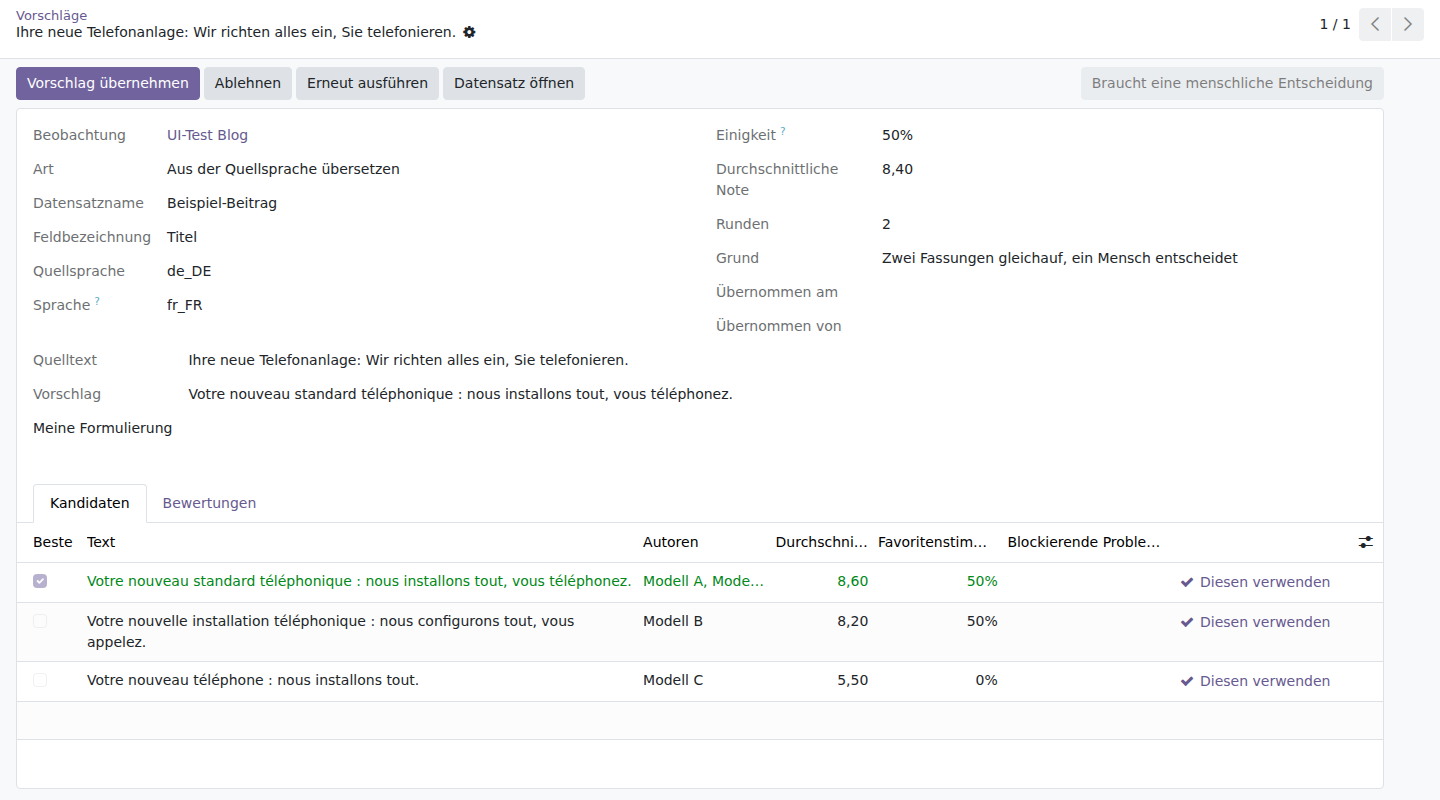
The text and provider names in this screenshot are fictitious and serve to illustrate the view.
If you trust a rule, you can enable Automatically accept consensus. Suggestions without consensus will still await a human decision. When applying a suggestion, the module checks again whether the source text has changed in the meantime, repeats the markup checks and writes the result without tracking changes or notifying followers.
Security and privacy
- Everything is disabled after installation. Providers and the scheduled action are disabled. Nothing is sent unless you take action.
- Texts leave your server whenever a hosted service is involved. You can mark a rule as Confidential; only providers marked as running on your own infrastructure will then receive the text.
- API keys are stored in a field visible only to administrators, or in an environment variable referenced only by name. They are masked in error messages and sent in headers. The exception is MyMemory's optional key, which can only be passed as a query parameter.
- Local command executes a program and is therefore blocked until the system parameter
ai_translation_consensus.allow_commandis set toTrue. The command is invoked without a shell and runs in an empty temporary directory. - Prompt injection: the prompts identify the text as data. Instructions within the text being translated are not followed, and any result that breaks tags or placeholders is discarded.
- Free services have limits. Pollinations allows one anonymous response every 45 seconds. The provider option
min_intervalenforces this interval, and “Please try again later” responses are respected.
Installation
git clone https://github.com/Alex0176/odoo-ai-translation-consensus.git
ln -s /pfad/odoo-ai-translation-consensus/ai_translation_consensus /pfad/addons/
ln -s /pfad/odoo-ai-translation-consensus/ai_translation_consensus_website /pfad/addons/
odoo-bin -c odoo.conf -d <datenbank> -i ai_translation_consensus --stop-after-init
Odoo 19 and the Python package requests are required. A German translation is included. The integration module ai_translation_consensus_website is installed automatically if website is present. After installation, the Odoo service must be restarted because the module contains Python code. If you run a production system, install the module on a copy of the database first.
To get started, open AI Translation → Providers, test and enable the services, then select Start here and create your first rule. Search for texts generates the suggestions; Process a batch calls the providers. Start with a small rule, such as a single blog post and two languages, and review the results and costs before queuing an entire website.
Limitations
- Quality depends on the models you enable. Cross-checking reduces errors by individual models but offers no guarantee. For legal or safety-critical texts, the module is no substitute for a native speaker.
- Costs add up quickly. Each text requires one call per translator, one review call per reviewer and a second round if the vote is split. Page context increases the input for each call. A rule with 45 target languages multiplies the number of texts. Limit runs using Records per search, New suggestions per search and Suggestions per cron run, and include inexpensive or local models as reviewers.
- Only fields with
translate=True. Formatted text is processed block by block using Odoo's term mechanism. - Prices and model names change. The presets are not a maintained price list.
- Built for Odoo 19.0 Community. Other versions are not supported.
Frequently asked questions
Will anything be translated or overwritten without my approval?
No, provided you leave Automatically accept consensus disabled. Even when enabled, only suggestions with consensus are written. Providers and the scheduled action are disabled after installation.
Do I need API keys for paid providers?
Only for providers that require one. Pollinations, MyMemory and locally hosted models (such as Ollama) work without one. Free services are often limited and slow, so for an entire website they are usually only suitable as a supplement.
How much does a translation cost?
That depends on the provider, model, text length and number of languages, so the module does not specify fixed amounts. Once you have entered prices, the dashboard shows usage and costs and estimates the remaining cost of queued texts.
Can I keep texts confidential?
Yes, using the rule's Confidential option. Only providers marked as running on your own infrastructure, such as a local Ollama instance, will then be used.
Does this replace Odoo's built-in translation system?
No. The module uses Odoo's multilingual capabilities and writes to the same translations you would otherwise maintain manually.
What licence is it released under?
AGPL-3. Bug reports and suggestions for improvements submitted as issues in the GitHub repository are welcome.
Support from Biricon IT Services
We support Odoo installations for small and medium-sized businesses, from implementation, customisation and migration to day-to-day operation. If you would like to run your Odoo website in multiple languages, use AI to cross-check translations or safely install a module in your production instance, we are happy to help. More of our custom modules: Archive a company and its portal users, Document numbers combining a prefix, year and counter and Company register and address validation for Austrian customers.
Last updated: 8 November 2026. Module version 19.0.1.2.0. The illustrations show fictional sample data.