
“How much do we actually still owe you?” Every customer base asks this question regularly, usually shortly before the end of the quarter, before the annual audit, or when the customer’s accounts department is preparing payments. If you don’t answer it yourself, it reaches you by email or phone, and someone has to export an open items list from the accounting system and send it. Odoo 19 Community doesn’t do this out of the box: the customer portal does show individual invoices, but no list of the open items for the whole company, and certainly not as of a freely chosen date.
To address this, we developed the Open Items in the Customer Portal module (portal_open_items) for Odoo 19. Customers whose access has been enabled can view a list of all their company’s outstanding invoices, credit notes and unallocated payments in the portal, choose a reporting date and download the list as a PDF. The module is free software under the AGPL-3 licence and is available on GitHub:
github.com/Alex0176/odoo-portal-open-items
We installed the module on our production system on 5 November 2026. There, the option is switched off by default and is only set after agreement with individual customers. Operating experience is therefore still short; we tested it with thirteen automated tests and a test database with sample customers. If you adopt the module, you should read the sections on Reporting date calculation, payment discipline and the limitations read.
Contents
- The problem: open items lists on request
- The solution at a glance
- Access for each contact: the option
- The list in the customer portal
- Open items as at a reporting date
- PDF export
- Payment discipline: the rating at a glance
- Who can see what? The access model
- Technical implementation
- Tests
- Installation and setup
- Limitations and notes
- Frequently asked questions
- Support from Biricon IT Services
The problem: open items lists on request
An open items list shows which of a customer’s invoices remain unpaid, which are overdue and the outstanding balance. For the supplier, it supports cash flow planning and credit control. For the customer, it provides a basis for planning payments, reconciling invoices with their own accounts and resolving queries without opening every invoice individually. Typical uses include:
- Quarter-end and year-end closing: The customer’s accounts department wants to know which liabilities existed on 31.12. This is an as-of date in the past.
- Reconciliation: The customer believes they have paid an invoice, but we still see it as outstanding. A shared list showing the date, due date and amount resolves this faster than an email chain.
- Payment runs: Anyone preparing weekly or monthly payments needs to see all outstanding invoices from a supplier at a glance, with overdue invoices at the top.
- Multiple contacts: In a company, one person places orders and another handles payments. Open items belong to the company, not to an individual.
Until now, we have manually extracted these lists from the accounting system and emailed them. That takes time and produces a snapshot that may already be out of date the next day. A better solution is a list that customers can open themselves in the portal at any time, always showing the latest position.
The solution at a glance
The module adds an Open Items page to the Odoo customer portal and a tile on My Account. Its features include:
- Option for each contact: “Show open items list in portal”. The portal user only sees the tile and page when this option is enabled. It is disabled by default.
- Entire company: The list includes open items for all contacts at the company, not just the user who is signed in.
- Reporting date: The customer selects a date and sees what was outstanding on that day.
- PDF export: The list as a PDF using your company’s layout, including letterhead, balance and total overdue amount.
- Payment discipline: share of invoices paid on time, slightly late and late, the longest open invoice and a rating of good or poor, in the portal and in the PDF.
- Overdue items are highlighted in colour and show the number of days overdue.
- Credit notes and credit balances appear as negative amounts in the list and reduce the balance.
- Links: Each invoice in the list links to its invoice view in the portal.
- Multilingual: The interface and PDF use the user’s language; a German translation is included.

The tile appears on the My Account home page alongside orders and invoices. Users without the option enabled do not see it.
Access for each contact: the option
An open items list displays business data for an entire company. The module therefore only enables access for portal users you explicitly authorise. The contact form includes a “Show open items list in portal” checkbox under Website. It is visible to users with invoicing permissions (group account.group_account_invoice) and applies to that contact alone.
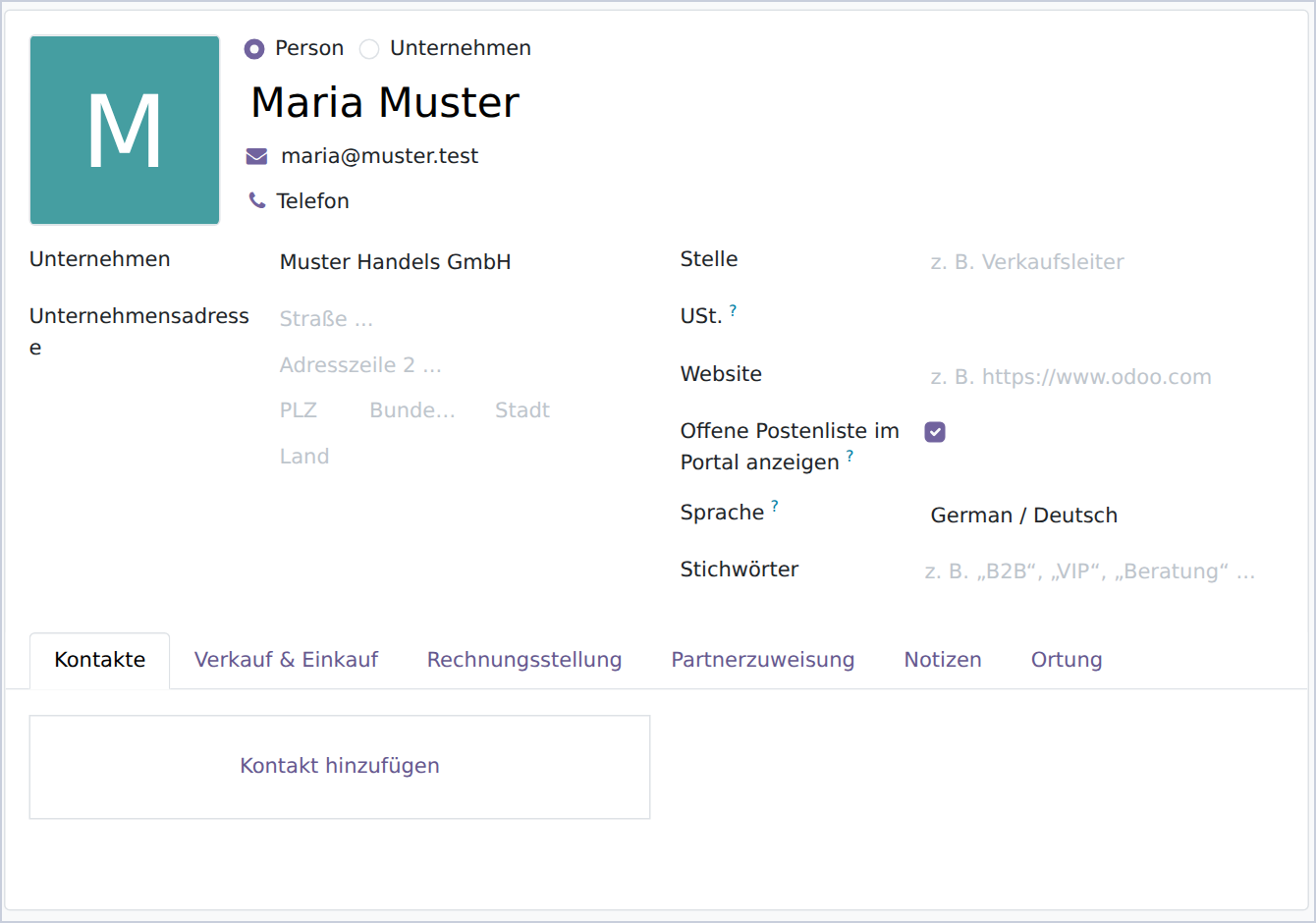
This reflects how companies work: management or the accounts team should be able to see the list, whereas an employee who only views tickets should not. The option applies to the contact, but the items displayed belong to the entire company. Enable it for the person who needs an overview of the company’s account.
The list in the customer portal
Clicking the tile opens /my/open-items. The page displays the company name, the reporting date selector and the table of open items:
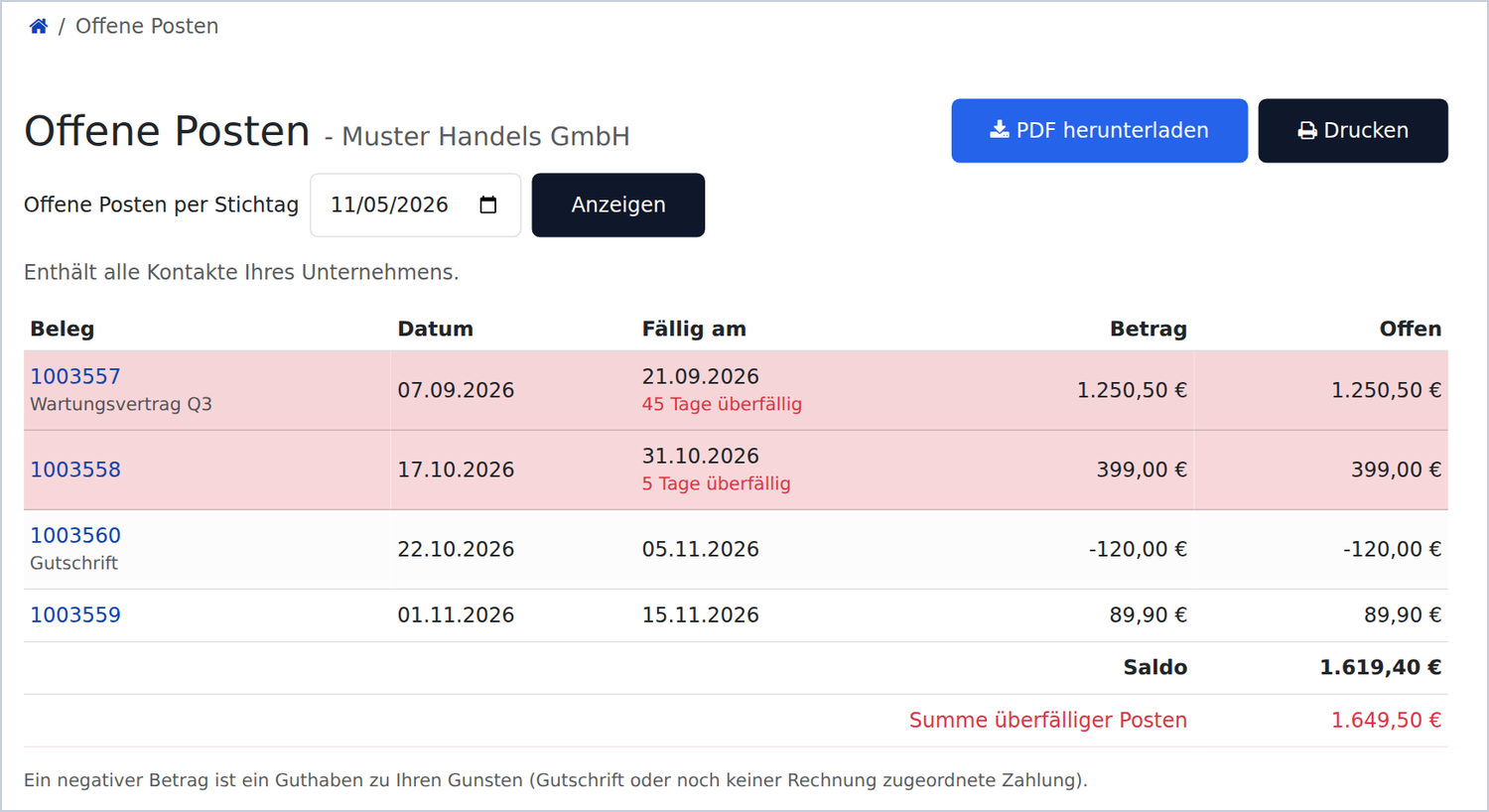
| Column | Contents |
|---|---|
| Document | Invoice or credit note number, linked to the invoice view in the portal; the reference appears underneath, if available |
| Date | Invoice date or posting date |
| Due date | Due date; for overdue items, “n days overdue” appears underneath in red |
| Amount | Original amount of the item |
| Outstanding | Amount still outstanding (after partial payments) |
Below the table are the balance, which is the sum of all outstanding amounts, and the total overdue amount. Overdue rows have a coloured background so they stand out at a glance. Credit notes and payments that have not yet been allocated to an invoice appear as negative amounts and reduce the balance; a note below the table explains this to the customer. If your company uses multiple currencies, a separate balance is shown for each currency.
Open items as at a reporting date
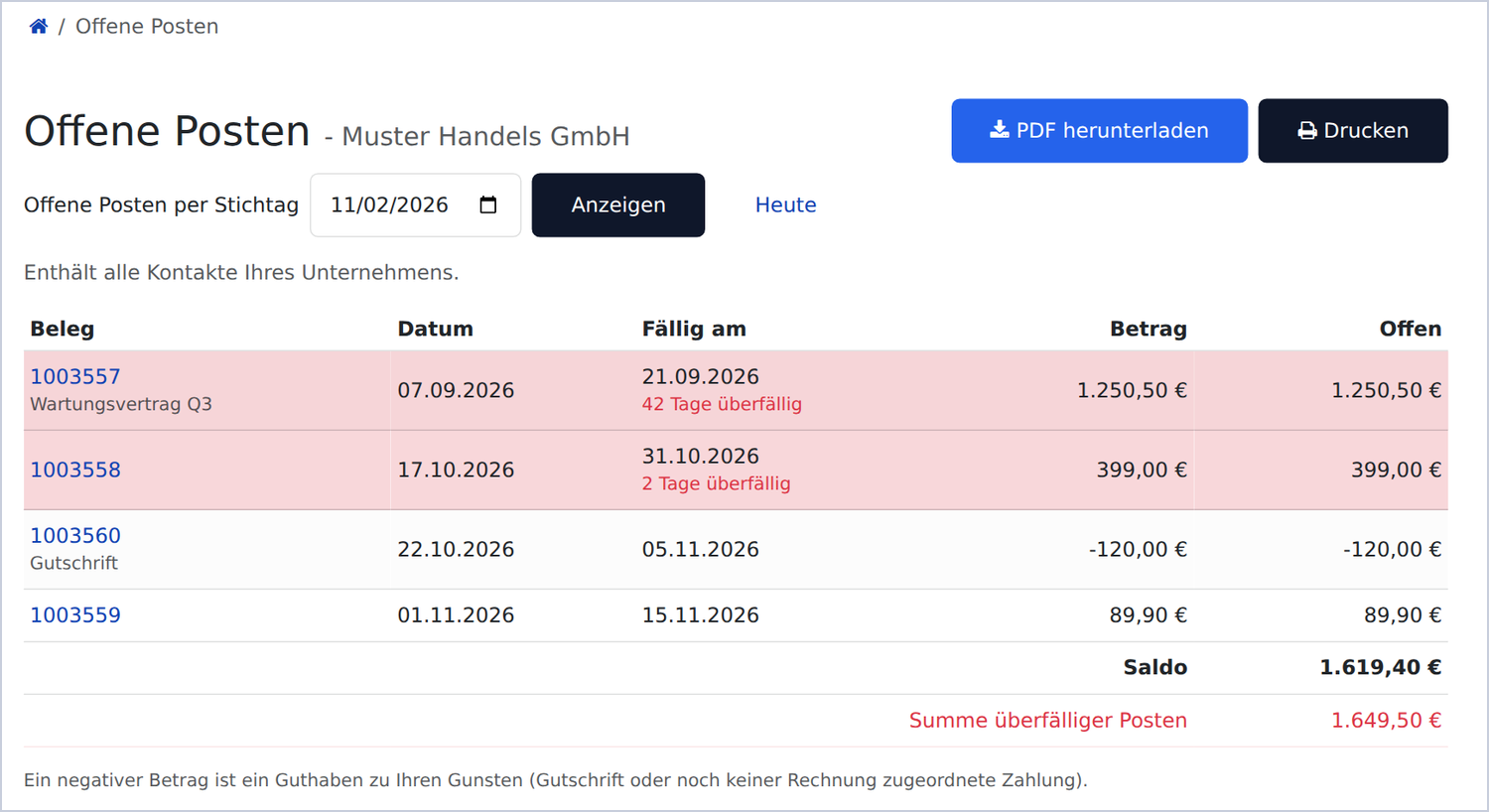
Above the table is “Open items as of date”, next to it a date field and the Show button. With an as-of date in the past, the list shows what was still unpaid on that day. This is exactly the report needed for closings, audits and reconciliations: “Which liabilities did we have to this supplier as of 31.12.?”
How amounts are calculated for the reporting date
For each item: Outstanding as at the reporting date = invoice amount minus all payments reconciled up to and including the reporting date. An item appears in the list if it had already been posted by the reporting date and still had an outstanding balance on that date. For example, an invoice dated 7 September for €1,250.50, partially paid with €500.00 on 20 October and settled in full on 5 November, appears with an outstanding amount of €750.50 for a reporting date of 2 November, but no longer appears for a reporting date of 5 November.
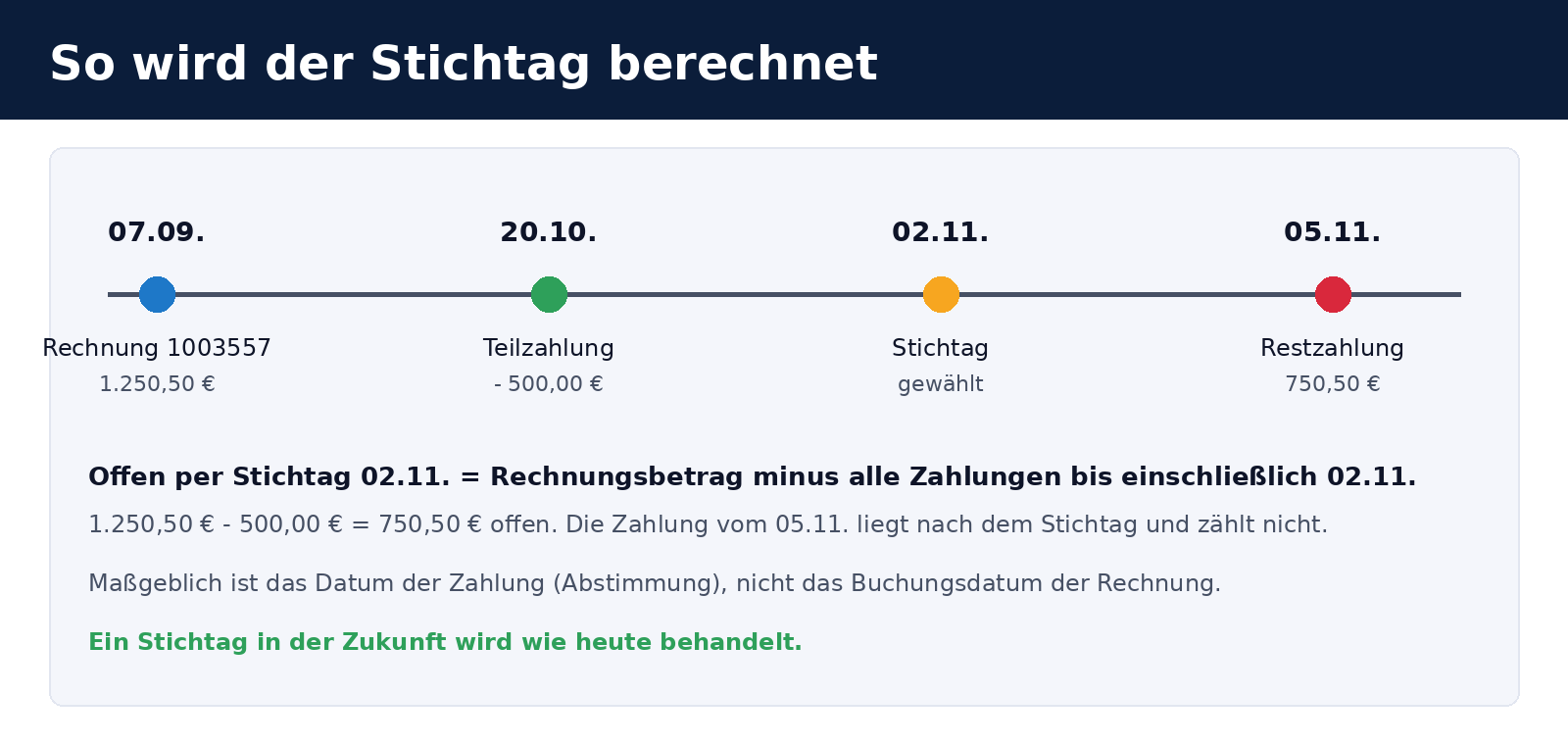
Overdue status is also assessed as at the reporting date: an item is overdue if its due date falls before the reporting date and its outstanding balance is positive. Days overdue are counted up to the reporting date, not today. A future reporting date is treated as today, as is an empty or invalid date in the address bar. This prevents the list from giving the impression that it provides a forecast.
What “payment date” means here
The relevant date is the date on which the invoice and payment were reconciled against each other in Odoo (the later of the two posting dates), rather than the invoice date. In the usual workflow, the payment is posted on the day it is received and allocated to the invoice. If payments are allocated several days later, the invoice remains outstanding for correspondingly longer. The section limitations explains this in more detail.
PDF export
Download PDF generates the list as a PDF file for the selected reporting date. The Print button opens the same list in the browser’s print dialogue. The PDF uses your Odoo company’s document layout (logo, address and footer from the settings) and the European paper size:
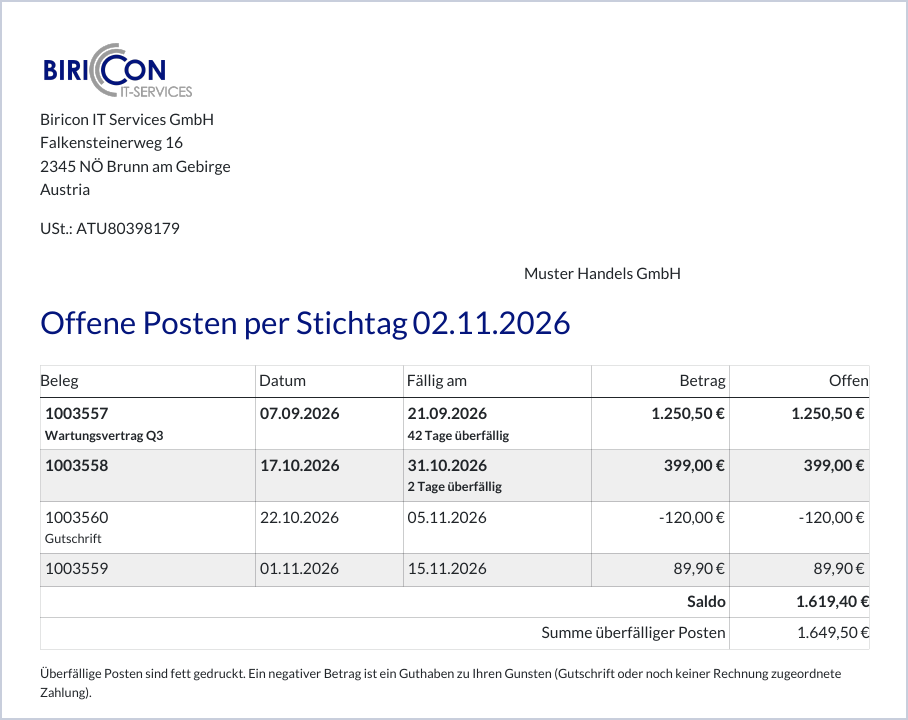
- Heading with as-of date: “Open items as of 02.11.2026”, even if the as-of date is today. If there are no open items, it says “There are no open items.”
- Customer address in the address field of the company layout, so the printed list is also properly addressed.
- Overdue items in bold so they also stand out in black and white.
- Balance and total overdue amount at the end of the table, shown separately for each currency if multiple currencies are used.
- Filename including the company and date, for example
Open_items_Muster_Handels_GmbH_2026-11-02.pdf.
Payment discipline: the rating at a glance
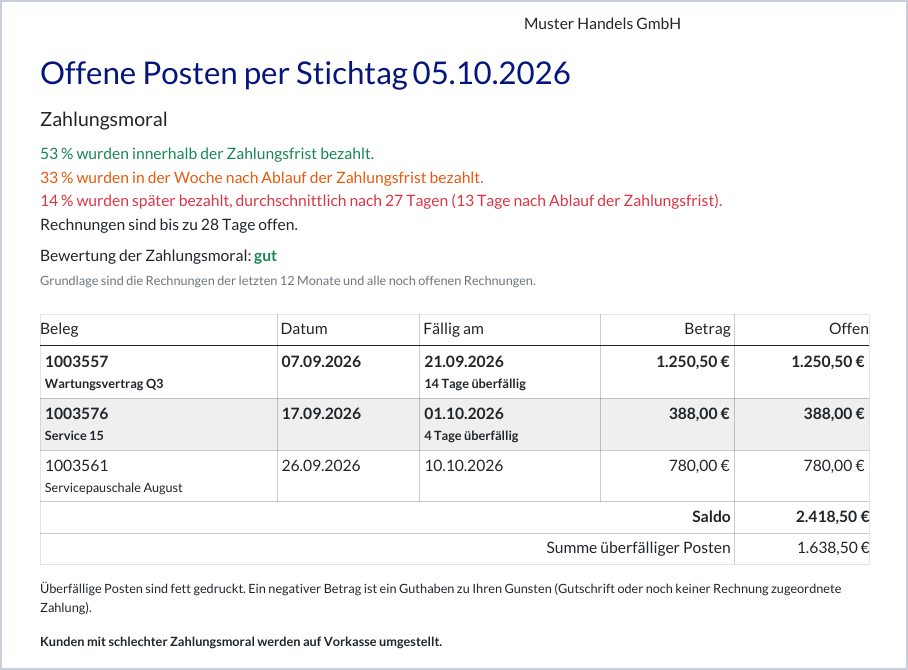
Since version 19.0.1.1.0, a short evaluation above the table shows how punctually the company pays its invoices. The same evaluation appears in the PDF. This lets customers see for themselves where they stand, and you no longer have to explain it to them separately.
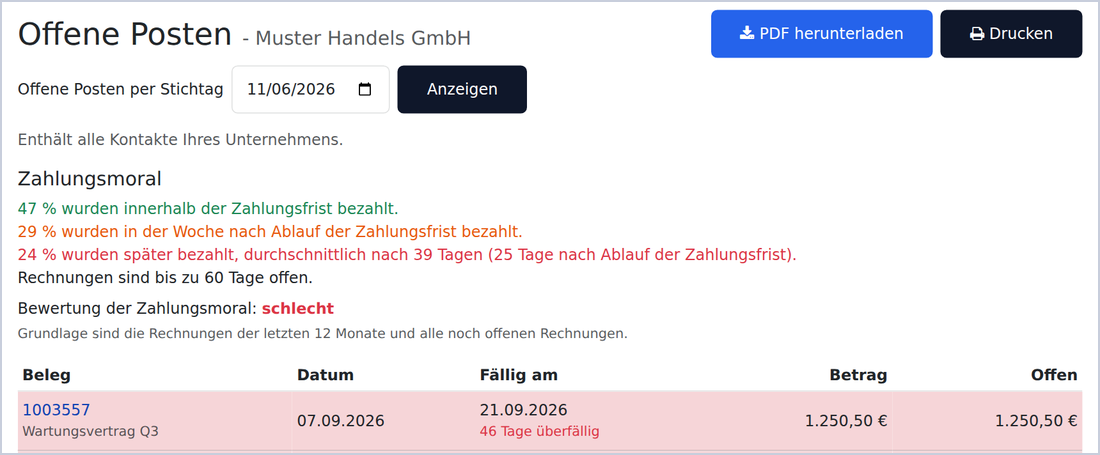
- Green: “47 % were paid within the payment period.” This refers to invoices paid on the due date or earlier.
- Orange: “29 % were paid in the week after the payment period expired.” These are payments one to seven days after the due date.
- Red: “24 % were paid later, on average after 39 days (25 days after the payment period expired).” The first number counts from the invoice date, the number in brackets from the due date. The line appears only if there are such invoices.
- “Invoices are open for up to 60 days.” This is the age of the oldest invoice that is still open on the as-of date, counted from the invoice date.
Below that is the payment discipline rating: good or poor, and at the bottom of the page, in the PDF at the end of the page, the note “Customers with poor payment discipline are switched to prepayment.” The PDF shows the same lines in the letterhead layout:
What is counted
- Invoices are rated that were issued to the customer and posted. Credit notes and drafts do not count. With payment in instalments, each instalment counts separately.
- Period: the invoices of the last twelve months and all invoices that are still open, even if they are older.
- Payment day is the date of the last reconciliation with a payment, as with the as-of date.
- Open invoices: If an invoice is overdue on the as-of date, it counts as if it had been paid on the as-of date, that is, orange or red. An open invoice that is not yet due is not rated.
- With an as-of date in the past, the position on that day applies: payments after the as-of date do not count yet.
- If there is nothing to rate, it says “No invoices from the last 12 months to rate.” and there is no rating.
When is the payment discipline “good”?
The rating is good if at least 70 % of the invoices are green or orange (on time or at most one week late) and no open invoice is more than 30 days overdue. Otherwise it is poor. The thresholds (7 days, 70 %, 30 days, 12 months) are constants at the top of models/res_partner.py and can be adjusted there.
Important: the module does not switch anyone to prepayment. The note in the footer is fixed text that shows customers with a poor rating what may follow from it. Whether and when you decide that is up to you. If the sentence does not suit you, change it in the two templates (portal page and report) or in the translation.
Who can see what? The access model
Open items are sensitive data, so access control mattered more to us than any additional feature. The model is deliberately simple:
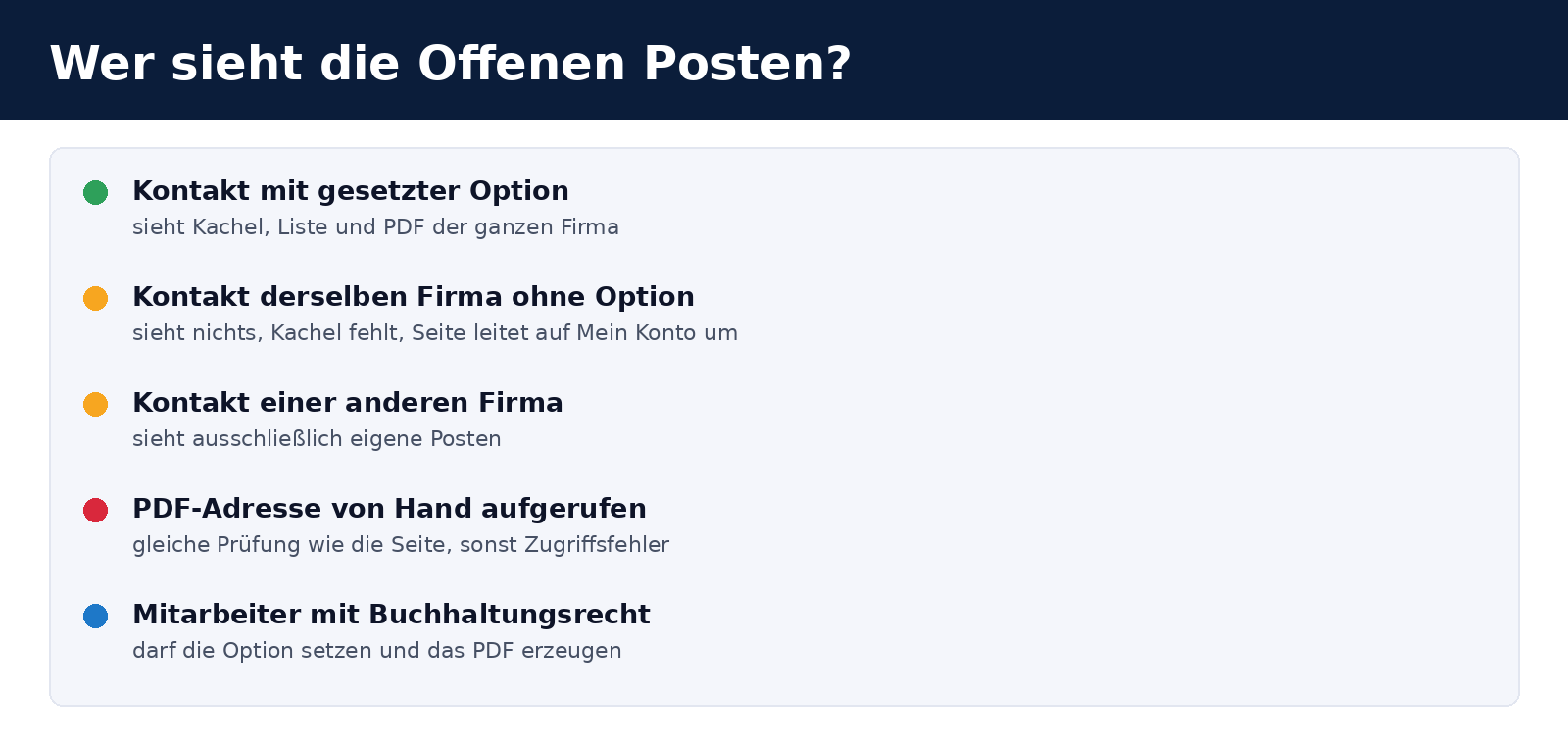
- Only with the option enabled. If the contact’s checkbox is not ticked, there is no tile, and visiting
/my/open-itemsredirects to My Account. - Always the user’s own company. The company is determined from the signed-in user, rather than a parameter in the URL. There is no way to request another company’s data through the address bar.
- The same check applies to the PDF. Odoo also makes PDF reports available through a generic URL. The module therefore checks permissions again within the report itself: only users with accounting permissions or portal users with the option enabled for their own company receive a PDF; everyone else receives an access error.
- Posted items only. Draft and cancelled documents never appear.
- Authorised accounting companies only: Only entries from companies the user can access are included.
Technical implementation
The module depends only on account and portal, both of which are part of Odoo Community. It adds a single field to the contact; the rest consists of a controller, a report class and templates.
| Component | Purpose |
|---|---|
portal_open_items field on res.partner | Boolean option “Show open items list in portal”; not copied when duplicating a record; disabled by default. |
_open_items_data() | Finds the company’s posted, unreconciled receivable lines and calculates each line’s outstanding amount, overdue status and days overdue. Returns the lines, totals by currency and reporting date. |
_payment_morale() | Evaluates the invoices of the last twelve months and all open invoices as of the as-of date: shares paid on time, up to seven days late and later, average duration, longest open invoice and the rating good or poor. |
_open_items_residual() | Outstanding amount of a line as at the reporting date: the amount minus all partial reconciliations dated up to and including the reporting date, in the invoice currency. |
/my/open-items controller | Displays the page, processes the reporting date (empty, invalid or future date = today) and redirects to My Account if the option is not enabled. |
/my/open-items/pdf controller | Generates the PDF for the same reporting date and serves it with a filename. |
report_open_items report | QWeb template using the company layout (web.external_layout), with its own permissions check. |
| Portal templates | Tile on My Account, breadcrumbs, and a page with a date selection form and table. |
| Contact form | Option in the Website section, visible only to the account.group_account_invoice group. |
| Translation | A German translation (de.po) and template (.pot) are included. |
Open items are read from journal items, rather than invoices. This matters: it ensures that credit notes and unallocated payments are included, and allows the position on a past date to be reconstructed from reconciliations (account.partial.reconcile). The query runs for the entire company (commercial_partner_id) with elevated permissions, after first checking whether the user is allowed to see the data.
Tests
The module includes eight automated tests, all of which pass in our environment:
- access only with the option enabled; otherwise, redirect to My Account,
- the list includes items for the entire company, but never those of another company,
- the option applies to each contact individually, rather than all users at the company,
- credit notes appear as negative amounts in the list and reduce the balance,
- reporting date: an invoice paid later appears in the list before payment, but not afterwards,
- the page with a future date and an invalid date,
- the PDF URL returns a PDF file,
- the report as HTML and the permissions check within the report.
- open amount as of the as-of date after partial payments before and after the as-of date,
- payment discipline: classification into on time, up to one week late and later, with the averages, also for an as-of date in the past,
- payment discipline with open invoices and the rating good or poor,
- payment discipline without invoices and never with another company’s data,
- payment discipline in the portal page and PDF.
We also tested the page in a browser using sample customers in a test database; the screenshots in this article come from that database. All names, document numbers and amounts shown are fictional.
Installation and setup
git clone https://github.com/Alex0176/odoo-portal-open-items.git
ln -s /pfad/odoo-portal-open-items/portal_open_items /pfad/addons/
odoo-bin -c odoo.conf -d <datenbank> -i portal_open_items --stop-after-init
The dependencies are account and portal. After installation, the Odoo service must be restarted because the module contains Python code. If you run a production system, install the module on a copy of the database first. Then:
- open the contact who should be able to see the list (a person with portal access),
- tick the Show open items list in portal checkbox on the form and save,
- sign in to the portal as that user, or check the tile, list, reporting date and PDF together with the customer.
Before enabling access, check your company’s sender details and layout settings, as the PDF takes its logo, address and footer from the document layout. The module itself does not send emails or generate notifications.
Limitations and notes
- Based on currently posted documents. The reporting date calculation uses entries as they currently stand in the system. If an invoice was cancelled or reset to draft after the reporting date, it will not appear in the list. This is not an immutable snapshot of “what was printed at the time”.
- Payments count from the reconciliation date. If a payment is allocated to an invoice several days after it is received, the invoice remains outstanding in the list until then. For accurate reporting by date, payments should be allocated promptly. Odoo Community does not include bank reconciliation against invoices; we use our Bank-Statement-Matcher module.
- Payment discipline is only as good as your reconciliation. What counts is when a payment was allocated to an invoice. Payments that have gone unreconciled for a long time make a customer look worse than they are. Check the rating for your customers before you draw any conclusions from it.
- The rating is visible to the customer. Anyone who has the option also sees the result and the note on prepayment. The module changes nothing about payment terms.
- Receivables only. The module shows what the customer owes you, rather than what you owe the customer.
- No reminder levels or payment links in the list. Customers can open an invoice from the list and pay it there, using the payment options available in your portal.
- PDFs and multiple worker processes. Odoo internally calls its own web address to generate PDF reports. If your system runs with only one worker process, this can cause it to block. This applies to all PDF reports in the portal, not just this module. Test the PDF button under real operating conditions after installation.
- Tested only on Odoo 19.0 Community. We have not tested it on other versions.
- No substitute for credit control or account statements. The list does not replace an accounting statement or your payment reminder processes; it simply makes the current position visible.
Frequently asked questions
What is an open items list?
A list of all invoices that remain wholly or partly unpaid, showing the invoice date, due date and outstanding amount. It is also referred to as “outstanding invoices”, a “customer account” or a “balance list”, although strictly speaking a balance list shows the balances of all accounts.
Why does the Odoo portal not provide an open items list out of the box?
The portal shows orders, invoices and payments individually, with statuses and filters. As far as we have seen, Community does not include a company-wide list with a balance or reporting as at a selected date. That is what this module provides.
Can all portal users at a company see the list?
No. Only contacts with the option enabled. However, the list shown covers the entire company, rather than just that contact’s invoices.
Can I choose an as-of date in the past, for example 31.12. of the previous year?
Yes, any date up to today. The list then shows items that had been posted and were still unpaid on that day. Please see the calculation notes: the payment reconciliation date is what counts.
Are future reporting dates supported?
No. Future dates are treated as today, so the list does not show a position that does not yet exist.
Do credit notes and advance payments appear in the list?
Yes. Credit notes and payments that have not yet been allocated to an invoice appear as negative amounts in the list and reduce the balance. A note below the table explains this to the customer.
How are overdue items identified?
An item is overdue if its due date is before the as-of date and it still has a positive outstanding balance. Days overdue are counted up to the as-of date.
Is the PDF available in other languages?
Yes, the interface and PDF use the user's language. A German translation is included; for other languages, simply add a .po file or translate via the Odoo interface.
Can a customer see another company's list by changing the URL?
No. The company is always determined by the logged-in user. The URL contains only the as-of date. Access via Odoo's PDF report URL is also checked again within the report itself.
How is the payment discipline calculated?
From the posted customer invoices of the last twelve months and all open invoices. For each invoice, what counts is how many days after the due date it was paid: at most on the due date (green), up to seven days after (orange) or later (red). The rating is good with at least 70 % green or orange and no invoice that is open and more than 30 days overdue. The details are in the section payment discipline.
Does the module switch customers with poor payment discipline to prepayment?
No. It only shows the rating and the note. Payment terms, prepayment and blocks remain your decision and your process in Odoo.
Does the module send emails or payment reminders?
No. It only provides the page and PDF. It does not create messages, notifications or activities.
Does the module work with Odoo Enterprise?
It depends only on account and portal, which are available in both editions. We have only tested it on the Community edition of Odoo 19.
What licence is the module released under?
AGPL-3. You may use, modify and redistribute it provided you comply with the licence terms. Bug reports and suggestions for improvements are welcome as issues in the GitHub repository .
Support from Biricon IT Services
We support Odoo installations for small and medium-sized businesses, from implementation, customisation and migration through to day-to-day operation. Whether you want to give your customers access to outstanding items, invoices and tickets in the portal, extend accounting in Odoo Community or safely deploy a module to your production instance, we are happy to help. More of our in-house developments: Archive a company and its portal users, Company register and address checks for Austrian customers, Document numbers using a prefix, year and counter and Product sets as sections in quotations.
As of: 6 November 2026. Module version 19.0.1.1.1. Changes since the first version of 5 November: payment discipline (19.0.1.1.0) and correction of the open amount as of the as-of date after partial payments (19.0.1.1.1). All names, document numbers and amounts in the figures are fictitious.